
Hardware Specifications
| Vendor/Brand | ODI |
| Model | DFP-34X-2C2 |
| Chipset | Realtek RTL9601D |
| Flash | 8 MB |
| RAM | 64 MB |
| System | Linux (Luna SDK 1.9) |
| HSGMII | Yes |
| Optics | SC/UPC(DFP-34X-2C2), SC/APC(DFP-34X-2C3) |
| IP address | 192.168.1.1 |
| Web Gui | ✅ user admin, password admin |
| SSH | ✅ user admin, password admin |
| Telnet | |
| Serial | |
| Form Factor | miniONT SFP |
Note
SSH uses an outdated set of algorithms/ciphers, you can connect using the following command:
ssh -oKexAlgorithms=+diffie-hellman-group1-sha1 -oCiphers=+3des-cbc -o HostKeyAlgorithms=ssh-rsa admin@192.168.1.1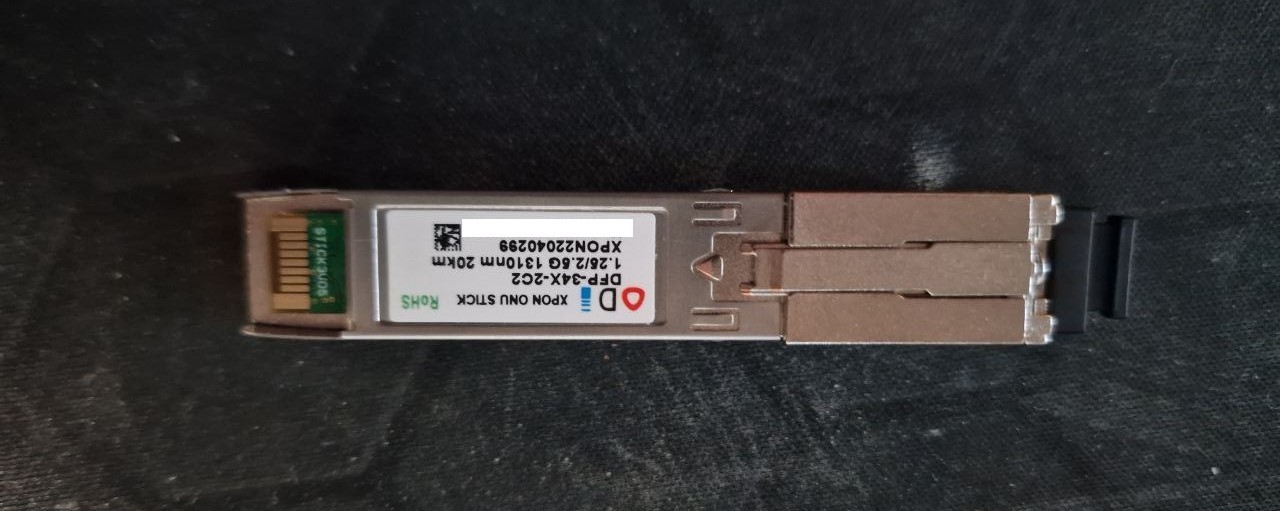
List of software versions
- V1.0-220923 (hybrid by @lanseyujie and @stich86)
- V1.0-220817
- V1.0-220530 (hybrid by @stich86)
- V1.0-220414 (vlan working)
- V1.0-220304
- V1.0-210702
List of firmwares and files
The recommended versions are M114_sfp_ODI_hybrid_220527.tar or M114_sfp_ODI_hybrid_220916.tar, as these have working VLAN translation.
List of partitions
| dev | size | erasesize | name |
|---|---|---|---|
| mtd0 | 00040000 | 00001000 | "boot" |
| mtd1 | 00002000 | 00001000 | "env" |
| mtd2 | 00002000 | 00001000 | "env2" |
| mtd3 | 0003c000 | 00001000 | "config" |
| mtd4 | 0014c000 | 00001000 | "k0" |
| mtd5 | 00274000 | 00001000 | "r0" |
| mtd6 | 0014c000 | 00001000 | "k1" |
| mtd7 | 00274000 | 00001000 | "r1" |
| mtd8 | 00001000 | 00001000 | "Partition_008" |
| mtd9 | 00001000 | 00001000 | "Partition_009" |
| mtd10 | 00001000 | 00001000 | "Partition_010" |
| mtd11 | 00001000 | 00001000 | "Partition_011" |
| mtd12 | 0014c000 | 00001000 | "linux" |
| mtd13 | 00274000 | 00001000 | "rootfs" |
This stick supports dual boot.
k0 and r0 respectively contain kernel and firmware of the first image, while k1 and r1 contain kernel and firmware of the second one.
Serial
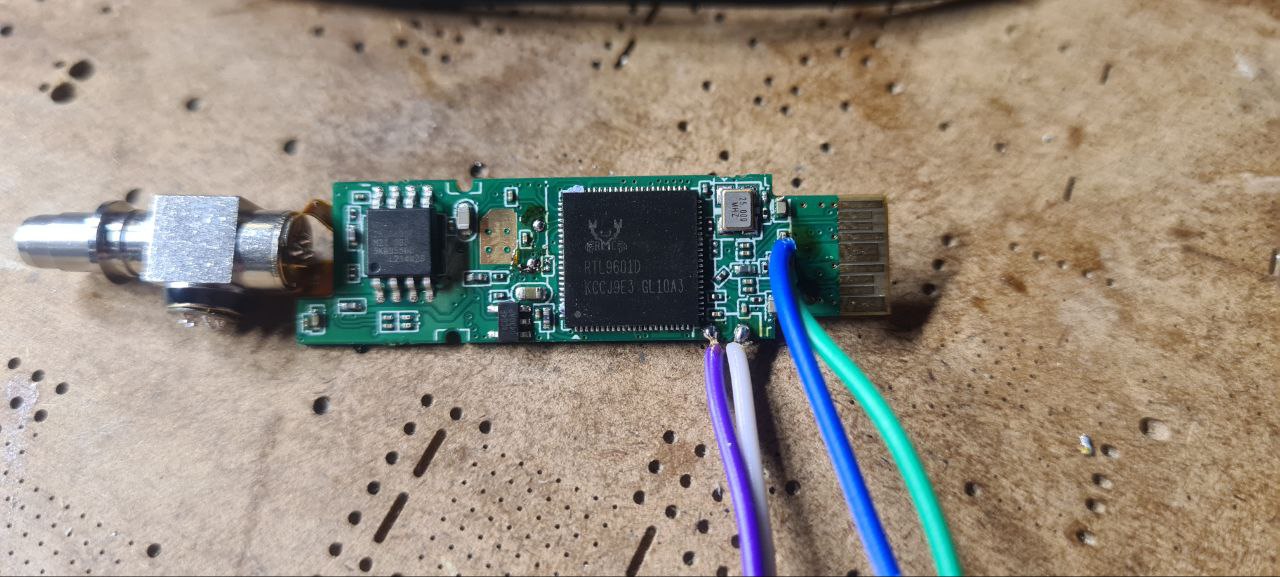
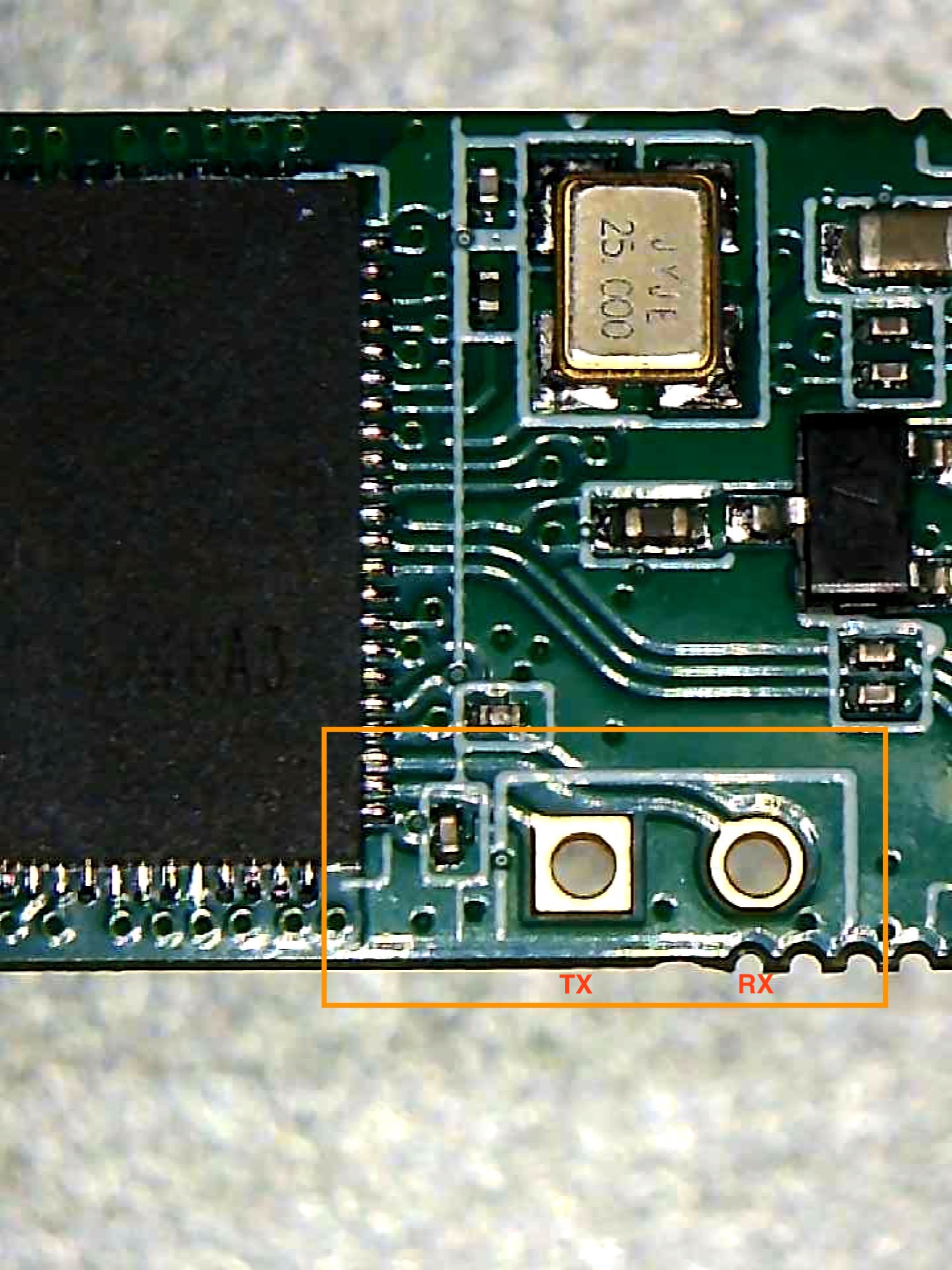
The stick has a TTL 3.3v UART console (configured as 115200 8-N-1) that can be accessed from the top surface: it's near the SFP header. TX, RX and ground pads need to be connected to a USB2TTL adapter supporting 3V3 logic.
Note
Some USB TTL adapters label TX and RX pins the other way around: try to swap them if the connection doesn't work.
Useful files and binaries
Useful files
/var/config/lastgood.xml- Contains the user portion of the configuration/tmp/omcilog- OMCI messages logs (must be enabeled, see below)
Useful binaries
flash- Used to manipulate the config files in a somewhat safe mannerxmlconfig- Used for low-level manipulation of the XML config files. Called byflashnv- Used to manipulate nvram storage, including persistent config entries vianv setenv/nv getenvomcicli- Used to interact with the running OMCI daemonomci_app- The OMCI daemondiag- Used to run low-level diagnostics commands on the stick
GPON ONU status
Getting the operational status of the ONU
diag gpon get onu-stateQuerying a particular OMCI ME
# omcicli mib get MIB_IDXGetting/Setting Speed LAN Mode
Note
Before editing the speed make sure your hardware supports it.
To change the link mode use this command:
# flash get LAN_SDS_MODE
LAN_SDS_MODE=0
# flash set LAN_SDS_MODE 1| Value | cat /proc/kmsg | Mode | Behavior |
|---|---|---|---|
| 1 | <4>change mode to 1(Fiber 1G) | FIBER | 1GbaseX with auto-neg on |
| 2 | <4>change mode to 2(SGMII PHY) | TP MII | 1Gb PHY |
| 3 | <4>change mode to 3(SGMII MAC) | MII | 1Gb MAC |
| 4 | <4>change mode to 4(HiSGMII PHY) | TP MII | 2.5Gb PHY |
| 5 | <4>change mode to 5(HiSGMII MAC) | MII | 2.5Gb MAC |
| 6 | <4>change mode to 6(2500BaseX) | FIBER | 2500baseX with auto-neg on |
| 7 | <4>change mode to 7(SGMII Force) | TP | 1GbaseT with auto-neg off |
GPON/OMCI settings
Getting/Setting ONU GPON Serial Number
# flash get GPON_SN
GPON_SN=TMBB00000000
# flash set GPON_SN TMBB0A1B2C3D
Getting/Setting ONU GPON PLOAM password
Note
The PLOAM password is stored in HEX format, without any 0x or separators
# flash get GPON_PLOAM_PASSWD
GPON_PLOAM_PASSWD=41414141414141414141
# flash set GPON_PLOAM_PASSWD 41414141414141414141
Getting/Setting OMCI software version (ME 7)
Note
This needs either OMCI_OLT_MODE to be set to 3 and firmware version 220530 or 220923 as modded by @stich86 or, if you don't want to replace the installed firmware, set OMCI_OLT_MODE value to 21. This will force the stick to use your own settings from the XML file, but this is a hack and causes sigsegv of /bin/checkomci.
# nv setenv sw_custom_version0 YOURFIRSTSWVER
# nv setenv sw_custom_version1 YOURSECONDSWVER
Getting/Setting OMCI hardware version (ME 256)
# flash get HW_HWVER
HW_HWVER=V2.0
# flash set HW_HWVER MYHWVERSION
Getting/Setting OMCI vendor ID (ME 256)
# flash get PON_VENDOR_ID
PON_VENDOR_ID=ZTEG
# flash set PON_VENDOR_ID HWTC
Getting/Setting OMCI equipment ID (ME 257)
# flash get GPON_ONU_MODEL
GPON_ONU_MODEL=DFP-34X-2C2
# flash set GPON_ONU_MODEL DFP-34X-XXX
Getting/Setting OMCI OLT Mode and Fake OMCI
Configure how ONT Stick handle OMCI from OLT:
# flash get OMCI_OLT_MODE
OMCI_OLT_MODE=1
# flash set OMCI_OLT_MODE 2| Value | Note | OMCI Information |
|---|---|---|
| 0 | Default Mode | Stock setting, some values cannot be changed |
| 1 | Huawei OLT Mode | Huawei MA5671a |
| 2 | ZTE OLT Mode | ZTE |
| 3 | Customized Mode | Custom Software/Hardware Version, OMCC, etc... |
| 21 | Owerflow Mode | Custom Software/Hardware Version, OMCC, etc... (this is a hack and causes sigsegv of /bin/checkomci) |
Some vendors/wholesale providers/ISPs have explicit LAN Port Number provisioning or proprietary OMCI that the stick cannot understand, this will make the stick reply OK to whatever the OLT sends it via OMCI.
0 = Disable, 1 = Enable, Default is 0
# flash get OMCI_FAKE_OK
OMCI_FAKE_OK=0
# flash set OMCI_FAKE_OK 1
Advanced settings
Setting management IP
# flash get LAN_IP_ADDR
LAN_IP_ADDR=192.168.2.1
# flash set LAN_IP_ADDR 192.168.1.1
Getting/Setting the L2 Bridge MTU
Note
Settings given via diag are not permanent after reboot
Getting/Setting the MTU of the L2 bridge
# diag switch get max-pkt-len port all
Port Speed
----------
0 1538
2 2031
# diag switch set max-pkt-len port all length 2000
Checking the currently active image
# nv getenv sw_active
sw_active=1
# nv getenv sw_version0
sw_version0=V1_7_8_210412
# nv getenv sw_version1
sw_version1=V1_7_8_210412
Booting to a different image
# nv setenv sw_commit 0|1
# reboot
Known Bugs
- Auto-sensing mode to switch between SGMII/HiSGMII