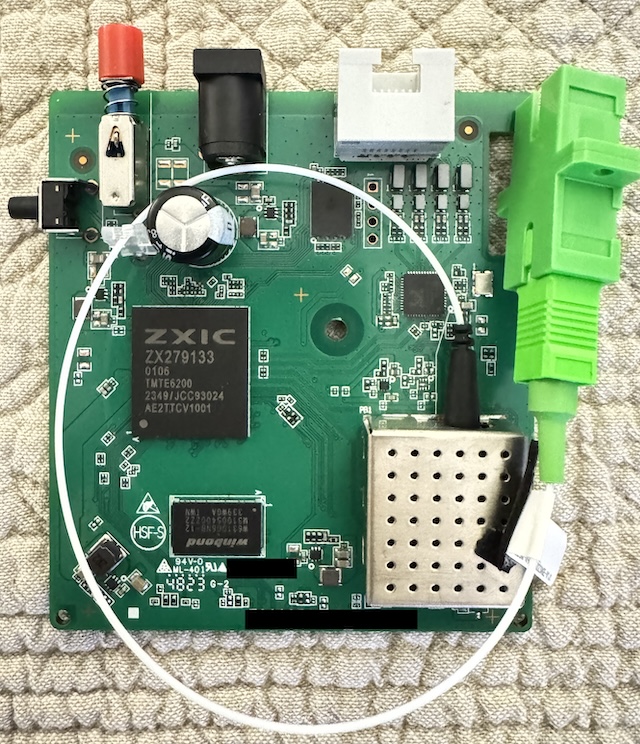
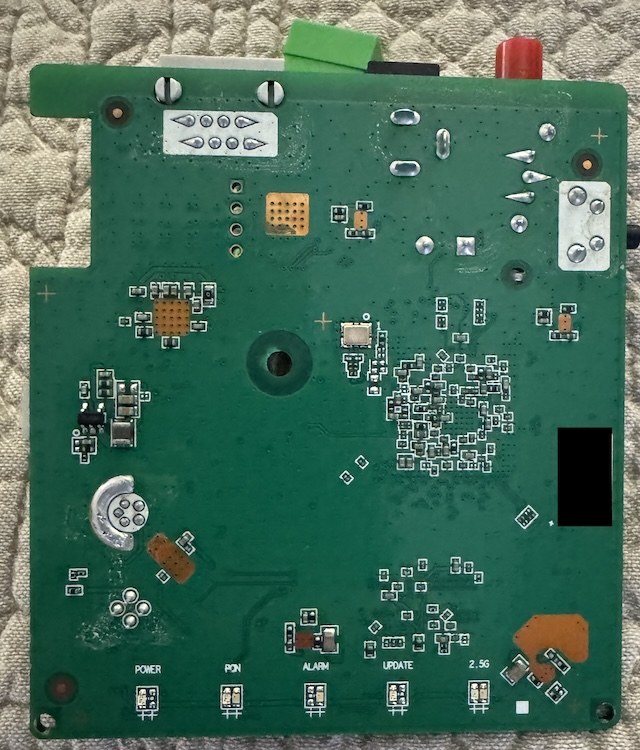
Hardware Specifications
| Vendor/Brand | ZTE |
| Model | F6005v3 |
| ODM | ✅ |
| CPU | ZTE ZX279133@Dual-Core A53 |
| CPU Clock | 1200MHz |
| Chipset | ZTE ZX279133 |
| Flash | 128 MB (SPI NAND FM25S01A) |
| RAM | 128 MB |
| System | Customized Linux by ZTE |
| 2.5GBaseT | Yes |
| Optics | SC/APC |
| IP address | 192.168.1.1 |
| Web Gui | ✅ user admin, password admin or defined by ISP |
| SSH | N/A |
| Telnet | ✅ [1] |
| Serial | ✅ [2] |
| Form Factor | ONT |
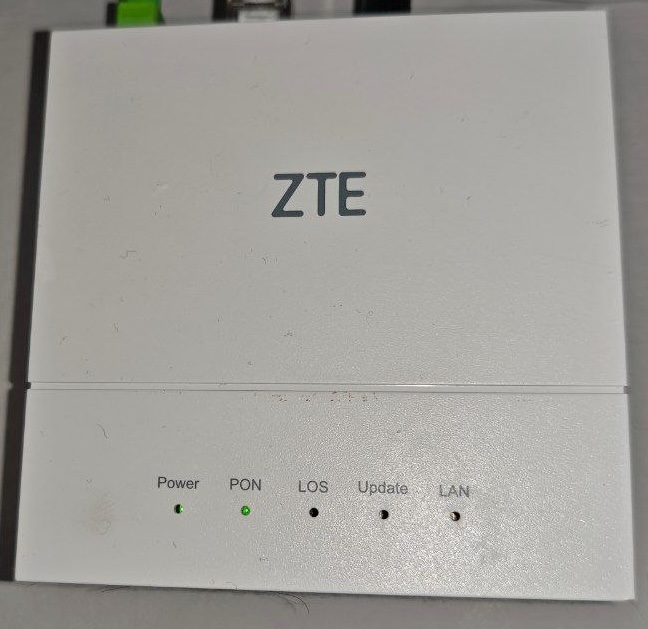
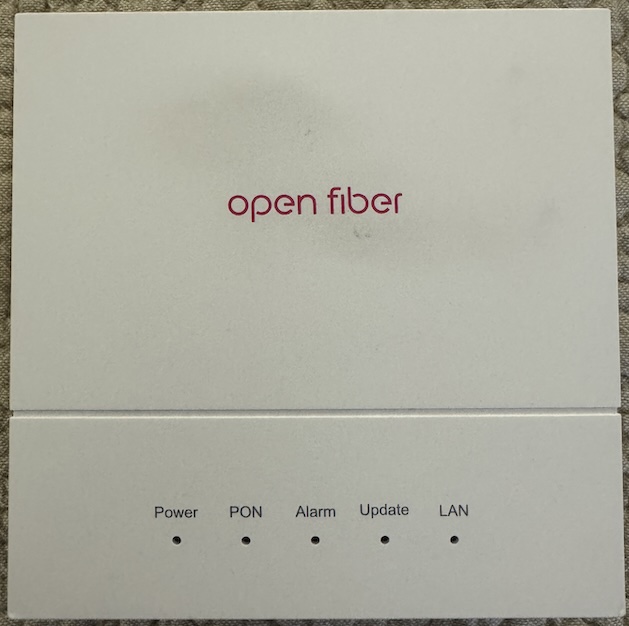
List of software versions
HW V3.0
- V3.0.10P3N2 (OpenFiber)
- V3.0.10N06 (TIM Italy) - Internal version is V3.0.10P2N6
List of partitions
HW V3.0
| dev | size | erasesize | name |
|---|---|---|---|
| mtd0 | 08000000 | 00020000 | "whole flash" |
| mtd1 | 00300000 | 00020000 | "uboot" |
| mtd2 | 00400000 | 00020000 | "others" |
| mtd3 | 00400000 | 00020000 | "parameter tags" |
| mtd4 | 00400000 | 00020000 | "wlan" |
| mtd5 | 00800000 | 00020000 | "usercfg" |
| mtd6 | 00400000 | 00020000 | "middle" |
| mtd7 | 02a00000 | 00020000 | "kernel1" |
| mtd8 | 02a00000 | 00020000 | "kernel2" |
| mtd9 | 02500000 | 00020000 | "rootfs1" |
| mtd10 | 029e0000 | 00020000 | "rootfs2" |
This ONT supports dual boot, as visible from the presence of kernel0 and kernel1, which contain the rootfs (JFFS2 read-only). The boot images can be swapped if they are the same or use the same U-Boot version. If you have a different U-Boot that was paired with the active image, do not attempt this, as it will brick the ONT, specially if TTL console is disabled.
upgradetest switchver XWhere X can be 0/1, based on the image you want to boot from.
Get current installed version for each region:
upgradetest getverYou can also clone the currently running image into the other slot using this command:
syn_versionYou can check currenlty running image using this command:
# cat /proc/csp/versionstates

baseaddress    : 0x1b00000
current        : 0
version1states : 0x83
version2states : 0x83
____________________________________________________
Index   Running Latest  CRC     Integrality     Type
----------------------------------------------------
0        Y       Y       N       Y              Upg
1        N       Y       N       Y              Upg
----------------------------------------------------
And check if the backup image has a valid CRC:
# upgradetest bakver
backup version crc is ok
success!
Use
Note
Commands have been tested on V3 HW rev. on OpenFiber and TIM firmwares
Enable Telnet
Note
This is an external script (ZTE ONU Telnet Enabler), use at your own risk! Credentials don't survive at reboot!
./zteOnu -i 192.168.1.1 -u admin -p adminIf Telnet is not opening, you are probably running a newer firmware, in that case change mac-address of the NIC connected to the ONT to 00:07:29:55:35:57 and use the flag --new:
./zteOnu -i 192.168.1.1 -u admin -p admin --newYou should get this output and credentials to login over telnet:
ZteONU 0.0.7, built at 09/10/2024
source: https://github.com/stich86/zteOnu
-----------------------------------
step [0] reset factory: ok
step [1] request factory mode: ok
step [2] send sq: ok
step [3] check login auth with user: ok
step [4] enter factory mode: ok
-----------------------------------
Success authenticated with user: admin and password: admin
Telnet Credentials (!! Temporary !!)
User: 9qNBo58H
Pass: OUBToR8J
Enable console redirection
To see omcidebug messages on telnet, execute this command (just the first time of each connection):
redir printfGPON ONU status
Getting the operational status of the ONU
To check the connection status, use the following command:
gpontest -gstate[gpontest] gpon state is [O5] for O5 state
Getting OLT vendor information
sendcmd 132 omcidebug showmedata 131This command will print the following output:
##################################
MIB INFO:
         ME CLASS: 131
         DB NAME: olt_g, DBHandle: 32
##################################

<-----MeID[ 0x0000,0 ], Addr[ 0x19a2b1]----->
         Vendorid:48 57 54 43
      EquipmentID:00 00 00 00 00 00 00 00 00 00
                    00 00 00 00 00 00 00 00 00 00
          Version:31 30 00 00 00 00 00 00 00 00
                    00 00 00 00
        TimeofDay:00 00 00 00 00 00 00 00 00 00
                    00 00 00 00
---------------------------------------------------------------------
Querying a particular OMCI ME
sendcmd 132 omcidebug showmedata ID_MIB (eg. 7 for Firmware version)This command will print the following output:
##################################
MIB INFO:
         ME CLASS: 7
         DB NAME: soft_image, DBHandle: 14
##################################

<-----MeID[ 0x0000,0 ], Addr[ 0x19a011]----->
          Version:V3.0.10P3N2
     Is committed:01
        Is active:01
         Is valid:01

<-----MeID[ 0x0001,1 ], Addr[ 0x19a031]----->
          Version:V3.0.10P2N6
     Is committed:00
        Is active:00
         Is valid:01
---------------------------------------------------------------------
GPON/OMCI settings
Getting ONU GPON Serial Number
setmac 2 2176
setmac 2 2177
Setting ONU GPON Serial Number
Note
Both S/N and VID have to be changed. 2176 is for the VID (first 4 letters of the S/N) and 2177 is for the last 8 digits of the S/N
setmac 1 2176 ZTEG
setmac 1 2177 AABBCCDD
Getting ONU GPON PLOAM password
setmac 2 2181
setmac 2 2178
Setting ONU GPON PLOAM password
Note
The PLOAM password is stored in the ASCII format.
This can be done easily via the Web UI.
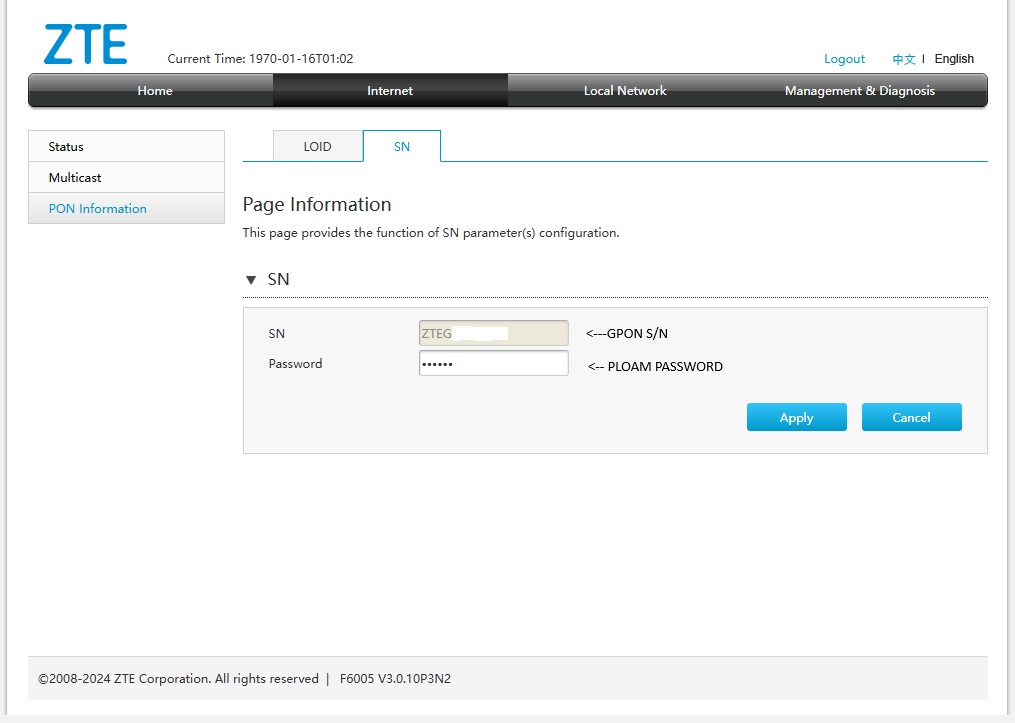
To do it via the shell use:
setmac 1 2181 1234567890
setmac 1 2178 1234567890
Setting ONU GPON Equipment ID
setmac 1 32770 "5::F6005V3.0:"Check Images CRC
upgradetest bakver

backup version crc is ok
success!
Persistent Telnet access
Note
This procedure was only tested on OF V3.0.10P3N2 and TIM V3.0.10N06 firmware and it's persistent after an upgrade from OLT
Note
If you change GPON Serial Number, Telnet will be disabled. You have to run again the tool to enable it
Needed tools:
Just run the enabled with --telnet flag to make Telnet persisten across Reboot (use --new flags and changed mac-address for newer firmware):
./zteOnu -i 192.168.1.1 -u admin -p admin --telnetZteONU 0.0.7, built at 09/10/2024
source: https://github.com/stich86/zteOnu
-----------------------------------
step [0] reset factory: ok
step [1] request factory mode: ok
step [2] send sq: ok
step [3] check login auth with user: ok
step [4] enter factory mode: ok
-----------------------------------
Success authenticated with user: admin and password: admin
Permanent Telnet succeed
User: root
Pass: Zte521
Wait reboot.. or powercycle itThe ONT will reboot, and you can log in later using root\Zte521 as the credentials.
Only for firmware versions with restricted admin access
In case you want add new a admin user instead of using the embedded credentials, run these commands before rebooting the ONT:
sendcmd 1 DB set DevAuthInfo 5 Enable 1
sendcmd 1 DB set DevAuthInfo 5 User superadmin
sendcmd 1 DB set DevAuthInfo 5 Pass superadmin
sendcmd 1 DB set DevAuthInfo 5 Level 1
sendcmd 1 DB set DevAuthInfo 5 AppID 1
sendcmd 1 DB saveasy
Reboot the ONT and you can login to the WebUI using superadmin\superadmin as credentials with full unlocked menus.
Advanced settings
Backing up ONT partitions using hardware flasher
It's possible to swap RAW dump between ONTs and enable access over Telnet to modify some ONT parameters.
Needed tools:
- Windows, Linux or macOS with SNANDer
- CH341a programmer with 3.3V voltage
- Pogo-Pin Probe for WSON8 8x6mm chip
Connect all needed cable from the probe to the programmer, then attach the probe to the chip (use some rubbers to make it stable) and run this command to dump the NAND:
/SNANDer -r f6005v3_dump_X.binDo at least 3 dumps and compare their md5 to be sure that are good.
If you want to flash this dump to another ONT, just run these commands:
/SNANDer -e
/SNANDer -w f6005v3_dump_X.bin -v
Changing region code
Note
Be aware that changing the region code may break features such as PPPoE depending on your ISP, and remove Telnet access!
ZTE has created various region codes that load default values based on the local ISP. This configuration can be changed using this command:
upgradetest sfactoryconf XWhere X is the number of supported regioncode into file /etc/init.d/regioncode, here is an example from TIM V3.0.10N06 firmware:
# cat /etc/init.d/regioncode
14:Thailand
97:ItalyTi
116:Tescali
154:Izzi
163:BrazilClaroHome
188:HollandKpnSfu
198:Manufacture
2074:ItalyFastwebSFU
Random notes
- This new ONT (and probably the XGSPON version as well) has Secure Boot enabled. All headers contain an RSA key that is verified by U-Boot and the CPU (for U-Boot itself), so there’s no way to repack the rootfs to make it fully spoofable (at the moment..).
- If your ONT is updated by the OLT (e.g., an F6005v3 OpenFiber ONT connected to a TIM OLT), the U-Boot partition will also be updated. After this update, it will no longer be possible to switch to the other partition because the signatures will not match, and TTL console is muted after U-Boot start.
Miscellaneous Links
Teardown and other photos
HW V3.0