
Hardware Specifications
| Vendor/Brand | HiSense |
| Model | LTF7267-BHA+ |
| ODM | ✅ |
| Chipset | Cortina CA8271A |
| Flash | 128MB |
| RAM | 128MB |
| System | Custom Linux by Cortina (Saturn SDK) based on Kernel 4.4 |
| XGMII/XSGMII | Yes |
| Optics | SC/APC |
| IP address | 192.168.0.1 |
| Web Gui | ✅ user admin, password system |
| SSH | ✅ user root, password hbmtsfp |
| Telnet | ✅ user root, password hbmtsfp |
| Serial | ✅ |
| Serial baud | 115200 |
| Serial encoding | 8-N-1 |
| Form Factor | miniONT SFP+ |
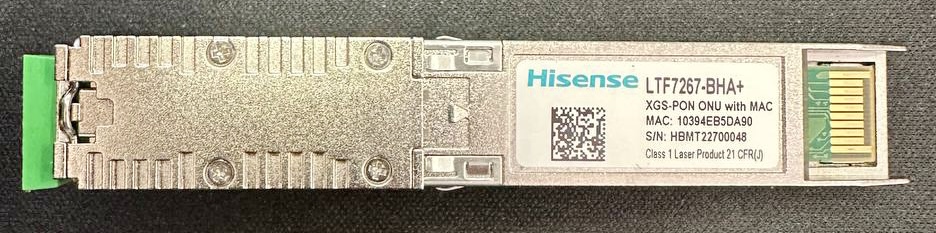
External/Internal Photo
Serial
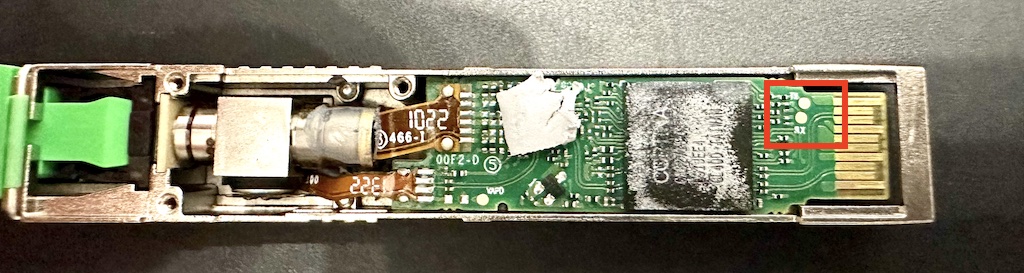
The stick has a TTL 3.3v UART console (configured as 115200 8-N-1) that can be accessed from the top surface. It's near the SFP header. TX, RX and ground pads need to be connected to a USB2TTL adapter supporting 3V3 logic.
Note
Some USB TTL adapters label TX and RX pins the other way around: try to swap them if the connection doesn't work.
List of software versions
- 22.05.26.1 - 20220527052622 (from /etc/hi_version - /etc/version)
List of partitions
| dev | size | erasesize | name |
|---|---|---|---|
| mtd0 | 00040000 | 00001000 | "ssb" |
| mtd1 | 00002000 | 00001000 | "uboot-env" |
| mtd2 | 00002000 | 00001000 | "dtb0" |
| mtd3 | 0003c000 | 00001000 | "kernel0" |
| mtd4 | 00300000 | 00001000 | "rootfs0" |
| mtd5 | 004c0000 | 00001000 | "dtb1" |
| mtd6 | 00300000 | 00001000 | "kernel1" |
| mtd7 | 004c0000 | 00001000 | "rootfs1" |
| mtd8 | 00001000 | 00001000 | "userdata" |
| mtd9 | 00001000 | 00001000 | "squashfs_ubi" |
| mtd10 | 00001000 | 00001000 | "userdata" |
This ONT supports dual boot.
kernel0 and rootfs0 respectively contain the kernel and firmware of the first image, kernel1 and rootfs1 the kernel and firmware of the second one.
XGS-PON ONU status
To access Cortina Shell, needed to check OMCI settings and XGSPON status, use the following command:
# app-cliThis console can also be reached by opening a telnet connection to 192.168.0.1:2233
Checking Activation Status (from app-cli and telnet\ssh session)
Open two telnet sessions, one to 192.168.0.1 and one to 192.168.0.1:2233
Before running any commands on the second connection, on the first one tail the /var/log/messages file (needed to see the output of the next steps)
Cortina> enable
Cortina# config
Cortina(config)# aal
Cortina(config-aal)# xgpon
Cortina(config-aal-xgpon)# show activation_state 0
You will see the following output on the first shell:
[260426.782381] XGPON Activation Finite State Machine Information^M
[260426.788170] ----------------------------------------------------------------^M
[260426.795428] PON mode                 : 5(XGSPON)^M
[260426.800157] VendorID                 : 0x534d4253(SMBS)^M
[260426.805556] VSSN                     : 0x11223344^M
[260426.810423] TO1                      : 80000(unit:125us)^M
[260426.815879] TO2                      : 1000(unit:125us)^M
[260426.821543] S/W FSM current event    : EQD_ASSIGNMENT^M
[260426.826617] S/W FSM current state    : O5.1^M
[260426.831002] S/W FSM previous state   : O4^M
[260426.835131] S/W FSM running state    : O5.1^M
[260426.839476] H/W FSM current state    : O5.1^M
[260426.843830] H/W FSM previous state   : O4^M
[260426.847990] Activated counter        : 1^M
[260426.852085] ONU assigned ID          : 1 ^M
[260426.856244] PON-ID                   : 0x30313130 ^M
[260426.861210] Online time              : 260395200 miliseconds ( 26039520 system ticks)^M
[260426.869187] Registration ID: 0x000000000000000000000000000000000000000000000000000000000000000000000000^M
[260436.544953] ^M
Showing ONT configuration (from app-cli session)
Cortina> enable
Cortina# config
Cortina(config)# omci
Cortina(config-omci)# show info
You will see the following output:
=======================================
omcc       :0xa3
ipv4Addr   :0x7f000001
ipv4Mask   :0xffffff00
ipv4Gw     :0xffffff00
ponNum     :1
geNum      :0
xgeNum     :1
iphostNum  :1
potsNum    :0
veipNum    :0
ponSlot    :1
geSlot     :2
xgeSlot    :3
iphostSlot :0
potsSlot   :0
veipSlot   :4
oltType    :ZTE
ponMacMode :5
maxQ/Tc    :8
ispType    :COMMON
batteryBak :1
remoteDbg  :0
powerCsvMd :0
ipv6Flag   :0
veipIdp    :0
loid       :00
passwd     :
vendorId   :SMBSSMBS
sn         :SMBS
version    :F5684S_v1
eqId       :FIBER Box
mac        :0:13:25:0:0:1
iphostMac  :0:13:25:0:0:1
psk        :0x0000000000000000
=======================================
XGe Port idx 0 map to Port 6
Please note that some of the above fields are decoded incorrectly, such as sn and versionId
Getting OLT vendor information (from app-cli session)
Cortina> enable
Cortina# config
Cortina(config)# omci
Cortina(config-omci)# show me olt_g
You will see the following output:
me oltG has [1] instance
===========================================
Me: oltG
    Instance: 0x0
        oltVendorId[0]: 0x48
        oltVendorId[1]: 0x57
        oltVendorId[2]: 0x54
        oltVendorId[3]: 0x43
        eqId[0]: 0x20
        eqId[1]: 0x20
        eqId[2]: 0x20
        eqId[3]: 0x20
        eqId[4]: 0x20
        eqId[5]: 0x20
        eqId[6]: 0x20
        eqId[7]: 0x20
        eqId[8]: 0x20
        eqId[9]: 0x20
        eqId[10]: 0x20
        eqId[11]: 0x20
        eqId[12]: 0x20
        eqId[13]: 0x20
        eqId[14]: 0x20
        eqId[15]: 0x20
        eqId[16]: 0x20
        eqId[17]: 0x20
        eqId[18]: 0x20
        eqId[19]: 0x20
        version[0]: 0x31
        version[1]: 0x30
        version[2]: 0x0
        version[3]: 0x0
        version[4]: 0x0
        version[5]: 0x0
        version[6]: 0x0
        version[7]: 0x0
        version[8]: 0x0
        version[9]: 0x0
        version[10]: 0x0
        version[11]: 0x0
        version[12]: 0x0
        version[13]: 0x0
        timeOfDay[0]: 0x0
        timeOfDay[1]: 0x0
        timeOfDay[2]: 0x0
        timeOfDay[3]: 0x0
        timeOfDay[4]: 0x0
        timeOfDay[5]: 0x0
        timeOfDay[6]: 0x0
        timeOfDay[7]: 0x0
        timeOfDay[8]: 0x0
        timeOfDay[9]: 0x0
        timeOfDay[10]: 0x0
        timeOfDay[11]: 0x0
        timeOfDay[12]: 0x0
        timeOfDay[13]: 0x0
    No linked ME
Checking current connection type and configuration (GEM Port+Mac Brige)
Cortina> enable
Cortina# config
Cortina(config)# omci
Cortina(config-omci)# show connection
You will see the following output:
GEM:65534  | (DS, TCONT:NULL)
           --mutilcast no care
             |--Eth   :0x0301
GEM: 1024  | (BI, TCONT:0x100, allocId:1025)
           --Bridge + 802.1p:0x1
           --Map Pri 0xe8
           --Ani Map Vlan Total Num 1 Vid 100
             |--Eth   :0x0301
GEM: 1025  | (BI, TCONT:0x101, allocId:1281)
           --Bridge + 802.1p:0x1
           --Map Pri 0x17
           --Ani Map Vlan Total Num 1 Vid 100
             |--Eth   :0x0301
Checking VLAN filter
Cortina> enable
Cortina# config
Cortina(config)# omci
Cortina(config-omci)# show stream
You will see the following output:
Link to PPTP eth: ------->instance 0x301
    input TPID 0x8100 output TPID 0x8100
    dsMode:Inverse us rules
    -------------------------------------------------------------------
    |               Filter              |          Treatment          |
    |-----------------------------------|-----------------------------|
    |    Outer   |         Inner        | R |   Outer    |    Inner   |
    |------------|----------------------| E |------------|------------|
    | PRI | VID  | PRI | VID  | Filter  | M | PRI | VID  | PRI | VID  |
    |-----|------|-----|------|---------|---|-----|------|-----|------|
    |  15 | 4096 |  14 | 4096 |No filter| 3 |  15 |    0 |  15 |    0 |
    |  14 | 4096 |  14 | 4096 |No filter| 3 |  15 |    0 |  15 |    0 |
    |  15 | 4096 |  15 | 4096 |No filter| 0 |  15 | 4096 |   0 |    1 |
    |  15 | 4096 |   8 |  835 |No filter| 1 |  15 |    0 |   8 |  100 |
    |-----|------|-----|------|---------|---|-----|------|-----|------|
GPON/OMCI settings
Setting ONU GPON Serial Number
# vi /config/scfg.txtAppend the lines provided below to the file and save it to change the PON S/N:
STRING CFG_ID_PON_VENDOR_ID = SMBS;
INT CFG_ID_PON_VSSN = 0xAABBCCDD;
Reboot ONT to apply the change
Setting ONU GPON PLOAM password
Web procedure
Normal procedure
This ONT seems to support PLOAM passwords up to 288 bits in lenghth (36 ASCII characters, 72 Hex digits).
The PLOAM password is stored into 32 bit chunks (4 ASCII characters / 8 Hex digits), with each chunk being byte-swapped.
So, starting from the following PLOAM in ASCII format
A1B2C3D4E5It gets translated into the following HEX value:
0x41314232433344344535Which is then split into the following blocks (the last block gets padded with 0 to reach 8 digits):
BLOCK 0: 0x41314232
BLOCK 1: 0x43334434
BLOCK 2: 0x45350000
Each block is then byte-swapped (i.e. read each sequence of two digits from right to left):
BLOCK 0: 0x32423141
BLOCK 1: 0x34443343
BLOCK 2: 0x00003545
And then you can finally make the change persistent by modifying the configuration file:
# vi /config/scfg.txtAppend the lines provided below to the file and save it to change the PLOAM password:
INT             CFG_ID_PON_REGISTRATION_ID0                                         = 0x32423141;
INT             CFG_ID_PON_REGISTRATION_ID1                                         = 0x34443343;
INT             CFG_ID_PON_REGISTRATION_ID2                                         = 0x00003545;
Reboot the ONT to apply the change.
Setting ONU GPON LOID and LOID password
DANGER
The value 0x0 is null, take note of your LoID and password from the original ONT
# vi /config/scfg.txtAppend lines below to the file and save it to change LoID and LoID password
CHAR-ARRAY      CFG_ID_LOID                                                         = {0x30,0x30,0x0,0x0,0x0,0x0,0x0,0x0,0x0,0x0,0x0,0x0,0x0,0x0,0x0,0x0,0x0,0x0,0x0,0x0,0x0,0x0,0x0,0x0};
CHAR-ARRAY      CFG_ID_PASSWD                                                       = {0x0,0x0,0x0,0x0,0x0,0x0,0x0,0x0,0x0,0x0,0x0,0x0};
Reboot ONT to apply the change.
Setting OMCI software version (ME 7)
# fw_setenv img_version0 20220527052622
# fw_setenv img_version1 20220527052622
Reboot ONT to apply the change.
Setting OMCI hardware version (ME 256)
# vi /config/scfg.txtAppend the line provided below to the file and save it to change HWVER:
CHAR-ARRAY CFG_ID_GPON_VERSION = {0x46,0x35,0x36,0x38, 0x34,0x53,0x5f,0x76, 0x31,0x00,0x00,0x00, 0x00,0x00}; ##GPON version string, default value is V1.0Reboot ONT to apply the change.
Setting OMCI equipment ID (ME 257)
# vi /config/scfg.txtAppend the line providede below to the file and save it to change the EQID:
CHAR-ARRAY CFG_ID_GPON_EQID = {0x46,0x49,0x42,0x45, 0x52,0x20,0x42,0x6f, 0x78,0x00,0x00,0x00, 0x00,0x00,0x00,0x00, 0x00,0x00,0x00,0x00}; ##GPON ME ONU2G equiment id value, default is saturnReboot ONT to apply the change.
Advanced settings
Changing OLT Emulation Type
# vi /config/scfg.txtAppend the lines provided below to the file and save it to change Emulation Type:
STRING CFG_ID_PON_OLT_TYPE = ALCL; ##GPON OLT Vendor name, support ZTE,ADTRAN,ALCL,CALIX,SUMITOMO,CORTINA,HUAWEIReboot ONT to apply the change.
Changing OMCC Version
# vi /config/scfg.txtAppend the line provided below to the file and save it to change OMCC Version:
CHAR CFG_ID_OMCC_VERSION = 0xB2;Reboot ONT to apply the change.
Known Bugs
ALCLOLT mode uses some static configurations on MIBs, so if your OLT has strict configuration checks it might not work properly.- During initial tests the only currently working mode of the stick is
PPTP EthUni. - Stick can be configured to also emulate
VEIPmode (adding it to the scfg.txt file), but the current firmware doesn't link correctly the XGBE interface, so no traffic is passing between LAN and PON interfaces.